See how Meta's Muse can do your bookkeeping

QUICKBOOKS ALTERNATIVE

A QuickBooks alternative for owners who want bookkeeping handled

Bonnie combines cash-basis bookkeeping with a Free plan that includes bank imports and vendor rules. QuickBooks Online also offers a free plan, with different limits. Compare what is included before choosing a paid plan.

WHEN BONNIE FITS BETTER

When Bonnie is the better call

  • Accounting software has become another job you do at night.
  • You want the books done — bank feeds, documents, categories, P&L — not a dashboard to manage.
  • You'd rather answer narrow questions than maintain rules and reconcile screens.
WHEN QUICKBOOKS FITS BETTER

When QuickBooks is the better call

  • You want full DIY control across every setting, account, and report.
  • Your accountant's workflow is already built around QuickBooks.
  • You need a broad accounting suite — inventory, payroll add-ons, a large app ecosystem.

A FAIR COMPARISON

Bonnie and QuickBooks, side by side

Both products now offer permanent free plans. See the detailed comparison for current U.S. paid prices and feature limits.

QuickBooks OnlineBonnie
PlansFree and paid Online plansFree, monthly and annual plans
CategorizationAI-supported workflows; bank rules on eligible paid plansAI categorization and user-managed vendor rules
SetupYou configure the company file, chart of accounts, and rulesConnect your bank or upload statements — Bonnie starts from there
Your recurring jobCategorize, reconcile, keep upAnswer the questions in Review
ScopeFull accounting suite: invoicing, payroll add-ons, inventory, app ecosystemCash-basis bookkeeping: transactions, documents, categorization and P&L

Sources: QuickBooks Online pricing · QuickBooks Free

HOW BONNIE WORKS

Bookkeeping without running the software

Start from what you already have.

Bonnie starts from connected accounts and uploaded records — there's no company file to configure and no chart of accounts to build before the work can begin.

Let Bonnie do the categorizing.

Instead of managing accounts and rules yourself, you answer short questions when judgment is needed, and Bonnie applies your answers going forward.

Review the P&L, not the dashboard.

You get a reviewable profit and loss with source records attached — not another screen to operate line by line.

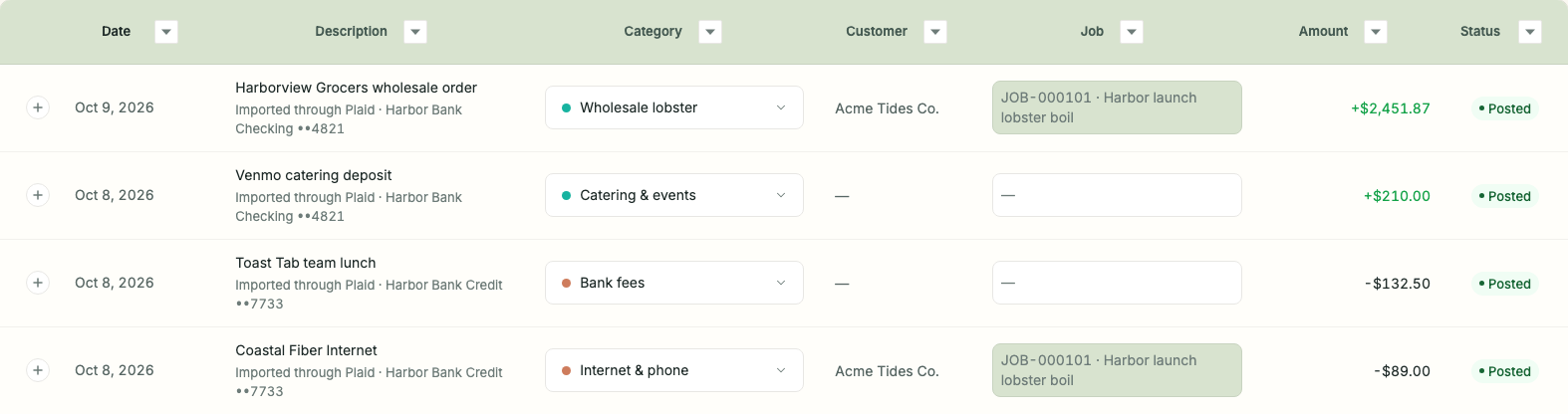
Bonnie's transactions table with categorized wholesale sales, catering, bank fees, and internet charges, amounts shown to two decimal places, customer and job assignments, and posted statuses
What “handled” looks like: categories filled in, statuses visible, your only job is the rows that need a call. From Bonnie's live demo — sample books for a harborside lobster shack. Try it yourself at mybonnie.ai/demo.

FAQ

Questions owners ask

Is Bonnie a QuickBooks clone?

No. QuickBooks is accounting software you operate; Bonnie is an AI bookkeeper that does the work and asks for your judgment. If you want full control of every setting and report, QuickBooks is the better fit — that's a real difference, not a knock on either.

How much cheaper is Bonnie than QuickBooks?

Both offer a permanent Free plan. Bonnie’s paid options are $15.00 per month or $150.00 per year. Check each provider’s current pricing page for paid-plan features and limits; introductory offers and optional services are separate.

Who should stay with QuickBooks?

Businesses that want full DIY accounting control, need a broad suite (inventory, payroll integrations, a big app ecosystem), or whose accountant's workflow is already built around QuickBooks. Bonnie is aimed at owners who want the bookkeeping handled, not another system to run.

Ready for cleaner books?

Start with Bonnie and turn bank activity, receipts, statements, and owner context into bookkeeping you can review.

Get started